Ever wished you could combine filters in more flexible ways? The new Filter Builder lets you create custom scans that match exactly how you think about setups.
How It Works
Instead of toggling individual filters on and off, you now build groups of conditions that work together.
A condition is a single rule:
- Price above $10
- Relative volume at least 2x
- Gapping up today
A group is a set of conditions that must all be true together. Think of it as describing one type of setup.
Your First Filter Group
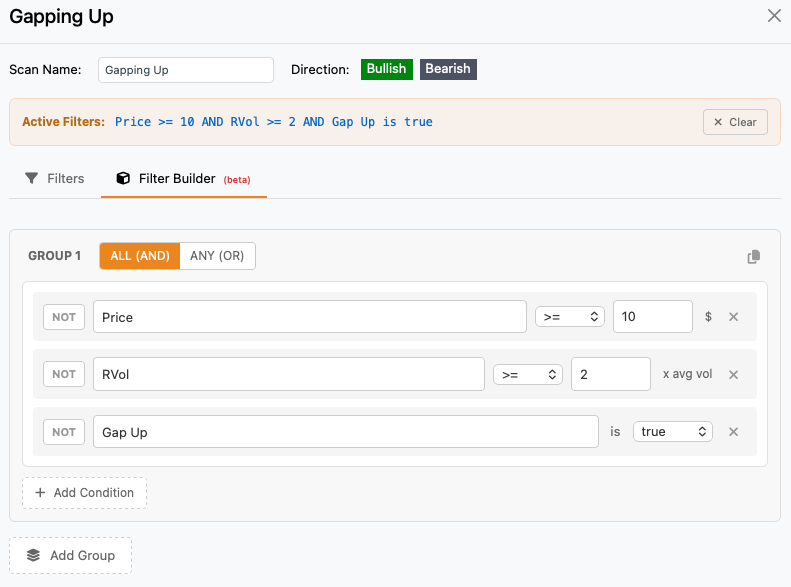
Let’s say you want to find stocks that are:
- Priced $10 or higher
- Have at least 2x relative volume
- Gapping up
https://www.zenbotscanner.com/custom/d2eceefb
In the Filter Builder, you’d create one group with all three conditions. A stock must meet all three to show up in your scan.
The Power Move: Multiple Groups
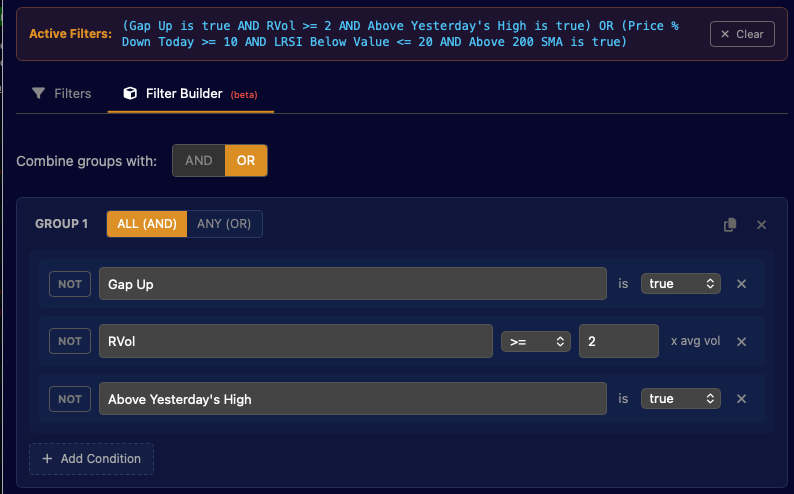
Here’s where it gets interesting. You can create multiple groups and combine them with “OR” – meaning a stock shows up if it matches any of your groups.
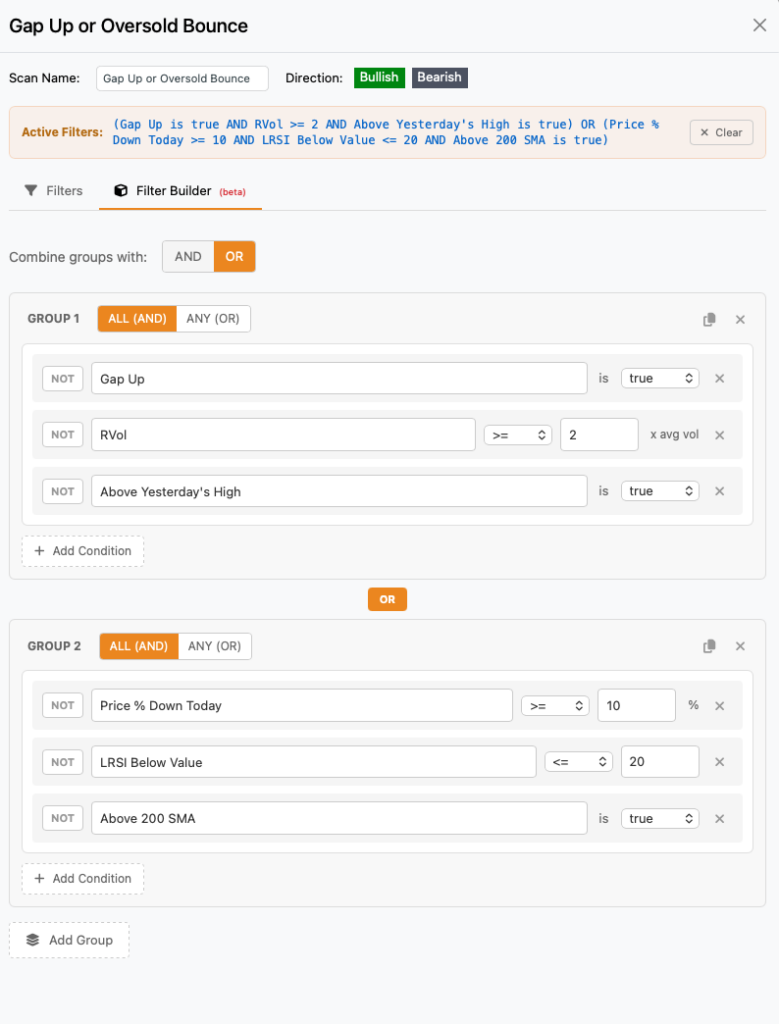
Example: Catch Two Different Setups in One Scan
Group 1 "Momentum Breakouts":
  - Gapping up
  - Breaking yesterday's high
  - 2x relative volume

        ─── OR ───

Group 2 "Oversold Bounces":
  - Down 10%+ today
  - LRSI oversold
  - Above 200 SMA
Now your scan finds both momentum breakouts AND oversold bounce candidates. One scan, two strategies.
https://www.zenbotscanner.com/custom/b997acae
Real Examples You Can Use
Morning Gap Scanner
Find gappers worth watching at the open:
Group 1:
  - Gap Up is true
  - Price above $5
  - Market cap at least $500M
  - Relative volume at least 1.5x
The “Show Me Everything Interesting” Scanner
Combine your favorite setups into one master scan:
Group 1 "EMA Crosses":
  - 3/8 EMA Cross Long is true
  - Relative volume at least 1.5x

        ─── OR ───

Group 2 "Bull Flags":
  - Bull Flag is true
  - Trending Up Now is true

        ─── OR ───

Group 3 "Key Reversals":
  - HA Reversal Long is true
  - Above VWAP
Earnings Plays
Find stocks with recent earnings that are moving:
Group 1:
  - Earnings Recently less than 3 days
  - Day change at least 5%
  - Relative volume at least 2x
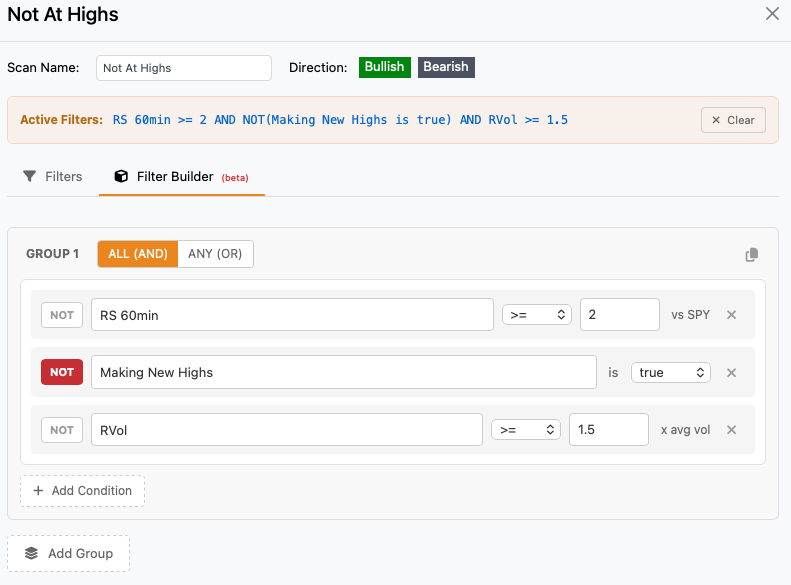
Finding Stocks That AREN’T Doing Something
Use the NOT button to exclude stocks. For example, find strong stocks that aren’t already at highs:
Group 1:
  - Relative strength at least 2
  - NOT Making New Highs
  - Relative volume at least 1.5x
Quick Tips
Start simple. One group, a few conditions. See what comes up, then refine.
Name your groups. Click on “Group 1” to rename it something meaningful like “Gap and Go” or “Reversal Setup.” Future you will thank present you.
Use “ANY” inside a group when you want flexibility. For example, if you want stocks showing ANY bullish pattern:
Group 1 (match ANY):
  - Bull Flag is true
  - 3/8 EMA Cross Long is true
  - HA Reversal Long is true
Clone groups to test variations. Hit the copy button, tweak one thing, compare results.
ALL vs ANY inside groups:
- ALL = stock must match every condition (more restrictive)
- ANY = stock must match at least one condition (more results)
What Filters Can I Use?
You can use almost any parameter or indicator value that ZenBot Scanner includes. Here are a few examples.
- Price & Movement: Price, day change (% or $), distance from high/low of day, distance from VWAP
- Volume: Relative volume, today’s volume, average daily volume, volume increasing
- Position: Above/below VWAP, above/below open, above/below yesterday’s high/low/close, at premarket high/low
- Fundamentals: Market cap, float, weekly options available, news today
- Patterns: Gap up/down, bull/bear flags, consolidating, making new highs/lows, EMA crosses, HA reversals
- Trends: Trending up/down, ZenTrend bull/bear, strong/weak daily
- Moving Averages: Above/below 50/100/200 SMA
- Relative Strength: 30min, 1hr, 2hr, 4hr (both intraday and daily)
- LRSI: Overbought, oversold, rising, falling
- Earnings: Earnings soon (days until), earnings recently (days since)
Getting Started
- Open the Filters panel on any scan
- Toggle from “Filters” to “Filter Builder” mode at the top
- You’ll see your first empty group ready to go
- Click “Add Condition” and start building
The Filter Builder is available now. Give it a try and let me know what you build!